WEB APP · GRANULAR INSIGHTS · SHIPPED 2025
Map as Navigation: Giving Sales Reps a Visual Way to see Their Fields
Role & Client
Role: Senior Product Designer at Corteva
Company: Valtech
Client: Corteva
Team: 1 Designer (me), 1 PM, Engineering Team
Output
Web feature, shipped to production in Granular Insights
Skills
Concept Design, AI Prototyping, Research Strategy, Usability Testing, Stakeholder Alignment
SNAPSHOT
What if the fastest way to find a field was to look at one?
Granular Insights is Corteva's tool for Pioneer seed sales reps managing hundreds of grower fields across dozens of farm operations. The product had everything reps needed: except the one thing they actually carry in their head: a map of where their fields are.
As Senior Product Designer, I led the concept and research that brought map-based navigation to the product. The feature shipped to production in 2025.
Solution
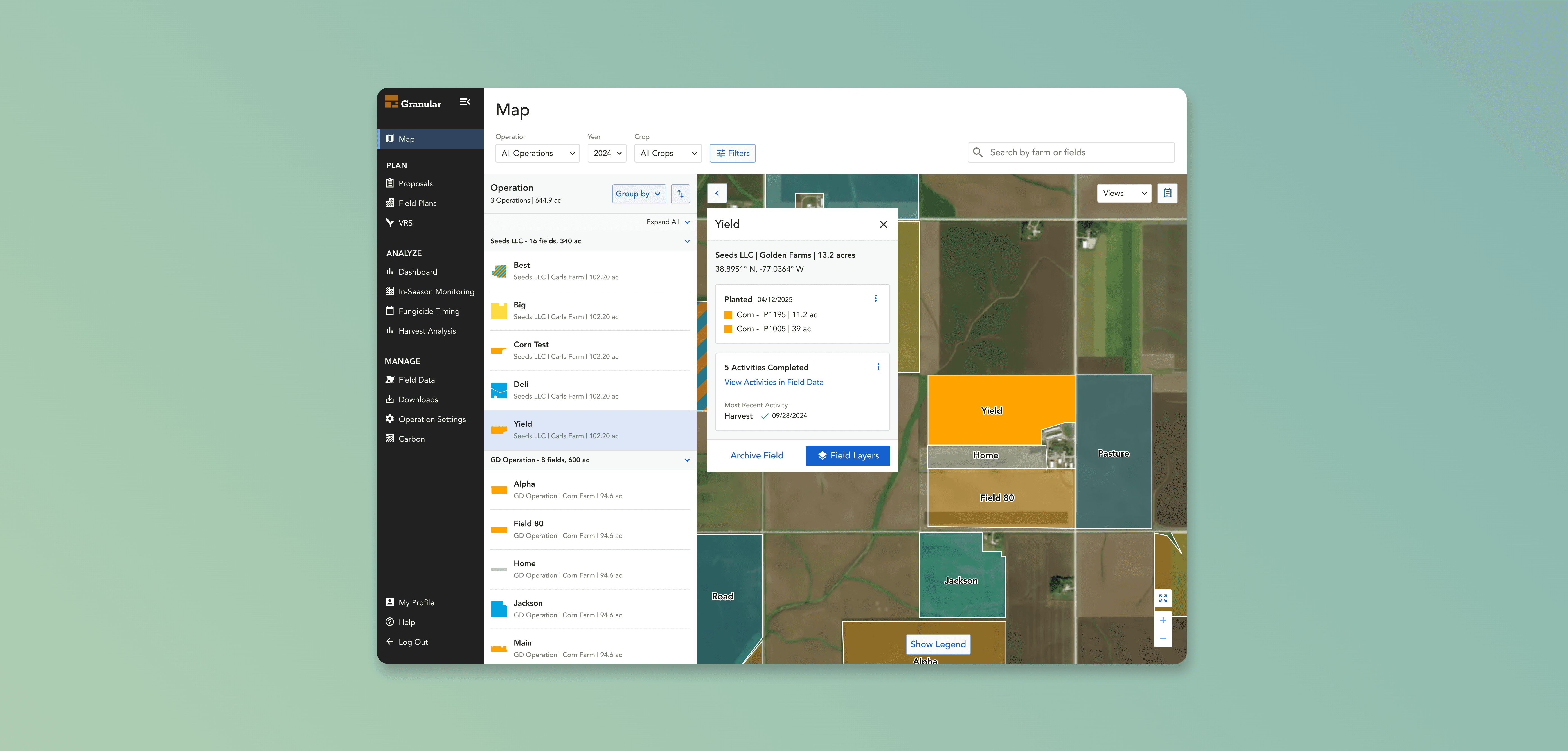
A dedicated map view that replaces the data table as the primary way to navigate: turning a 600-acre operation into something a rep can see in two seconds.
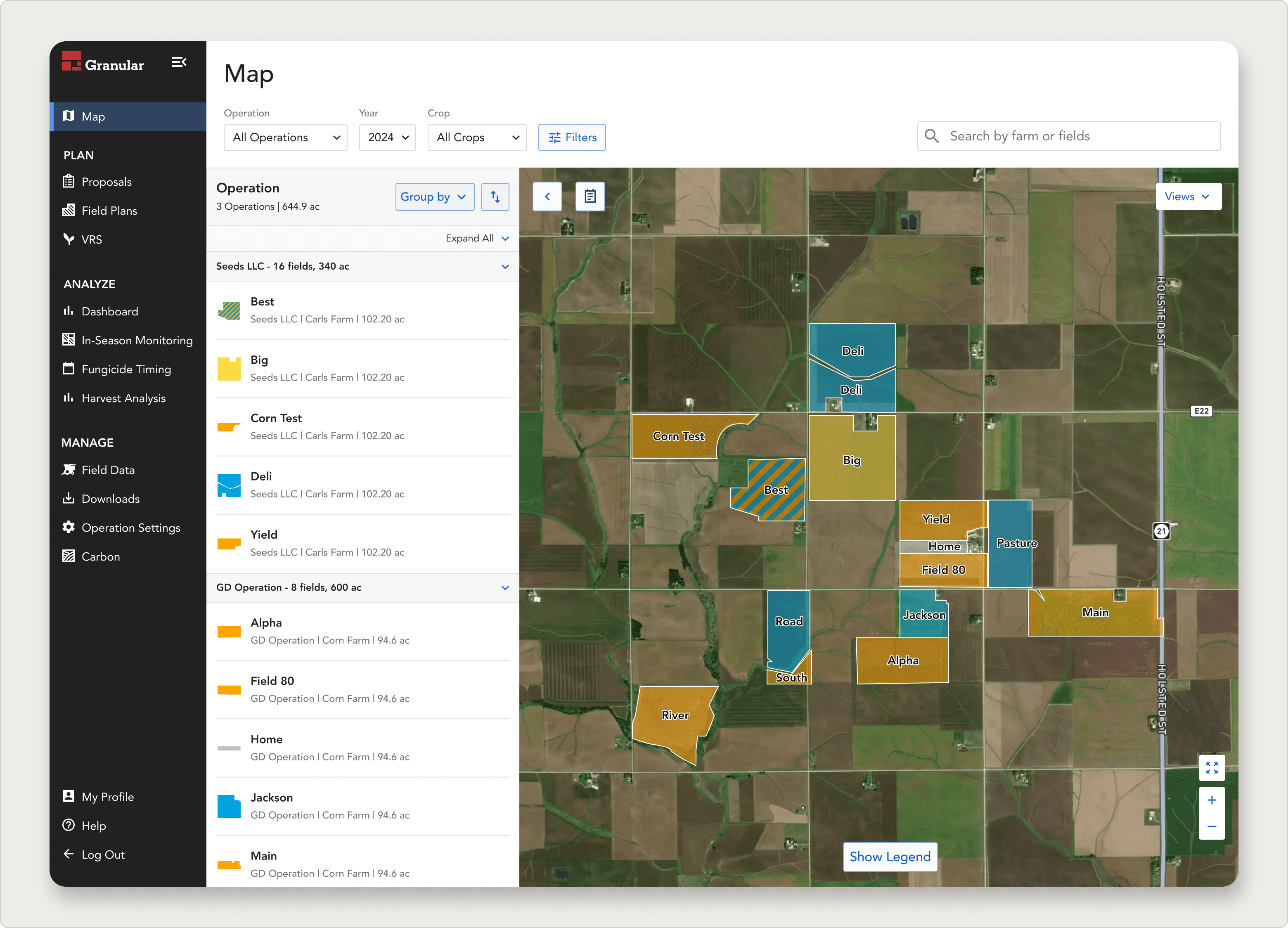
Cross-operational map view at default zoom
All operations and fields visible at once across both Seeds LLC and GD Operation — matching the rep's geographic mental model of their territory.
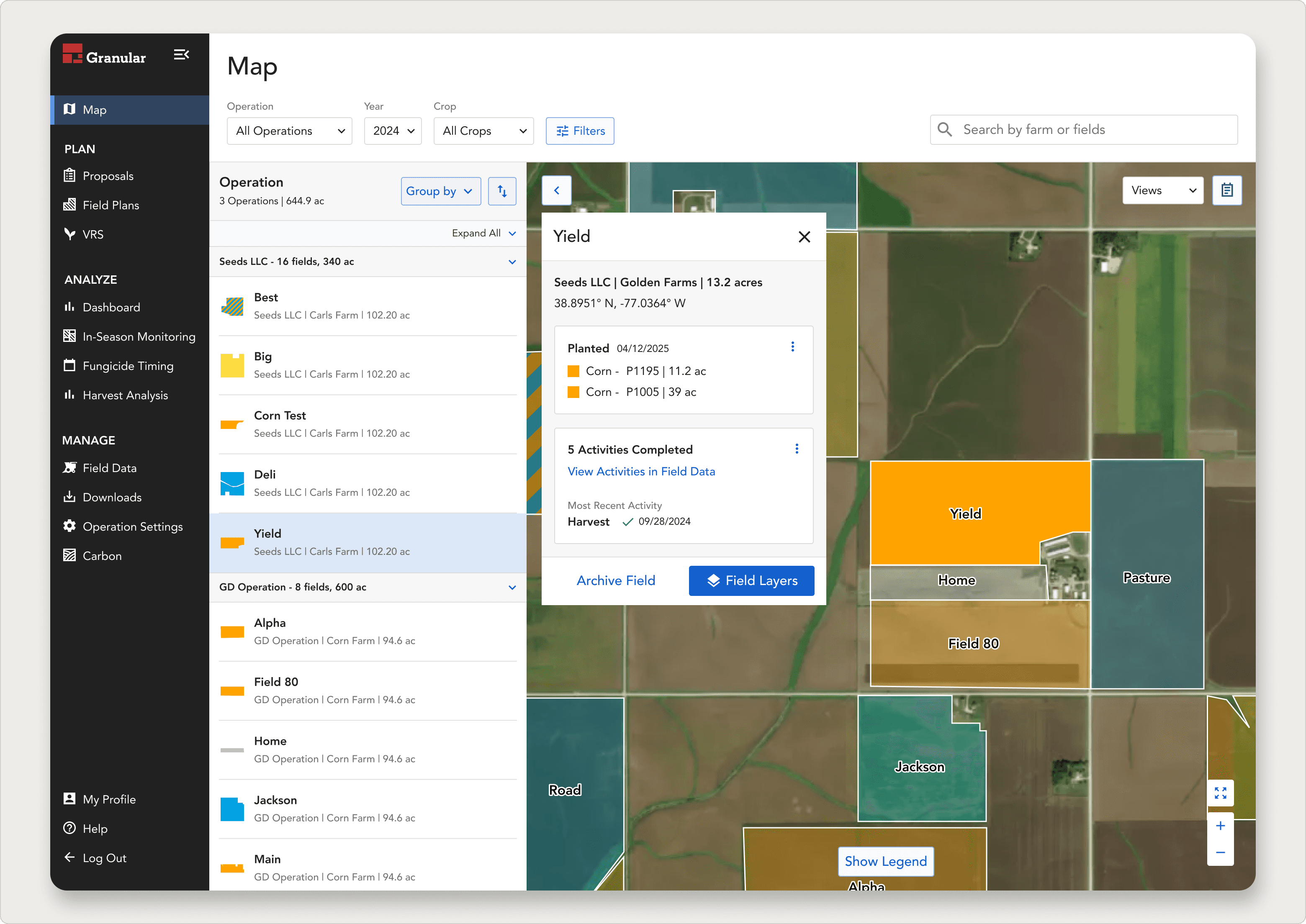
Field Details Panel triggered from a tapped field
Field cards surface crop type, acreage, and recent activity on tap — without leaving the map. Filters by operation, year, and crop narrow the view to what's relevant right now.
6/6
interviewed reps rated this feature useful in their daily work
8/10
average usefulness score — no onboarding needed
Live
Shipped to production in Granular Insights web app
THE QUESTION
Should we even build this?
Coming in, the team didn't agree on whether a map was worth building. Some voices argued reps had everything they needed in the data table. Others heard the opposite on customer calls. Without data, the conversation kept stalling on opinion.
I was asked to settle the question the right way: build a concept, put it in front of real reps, and let research decide.
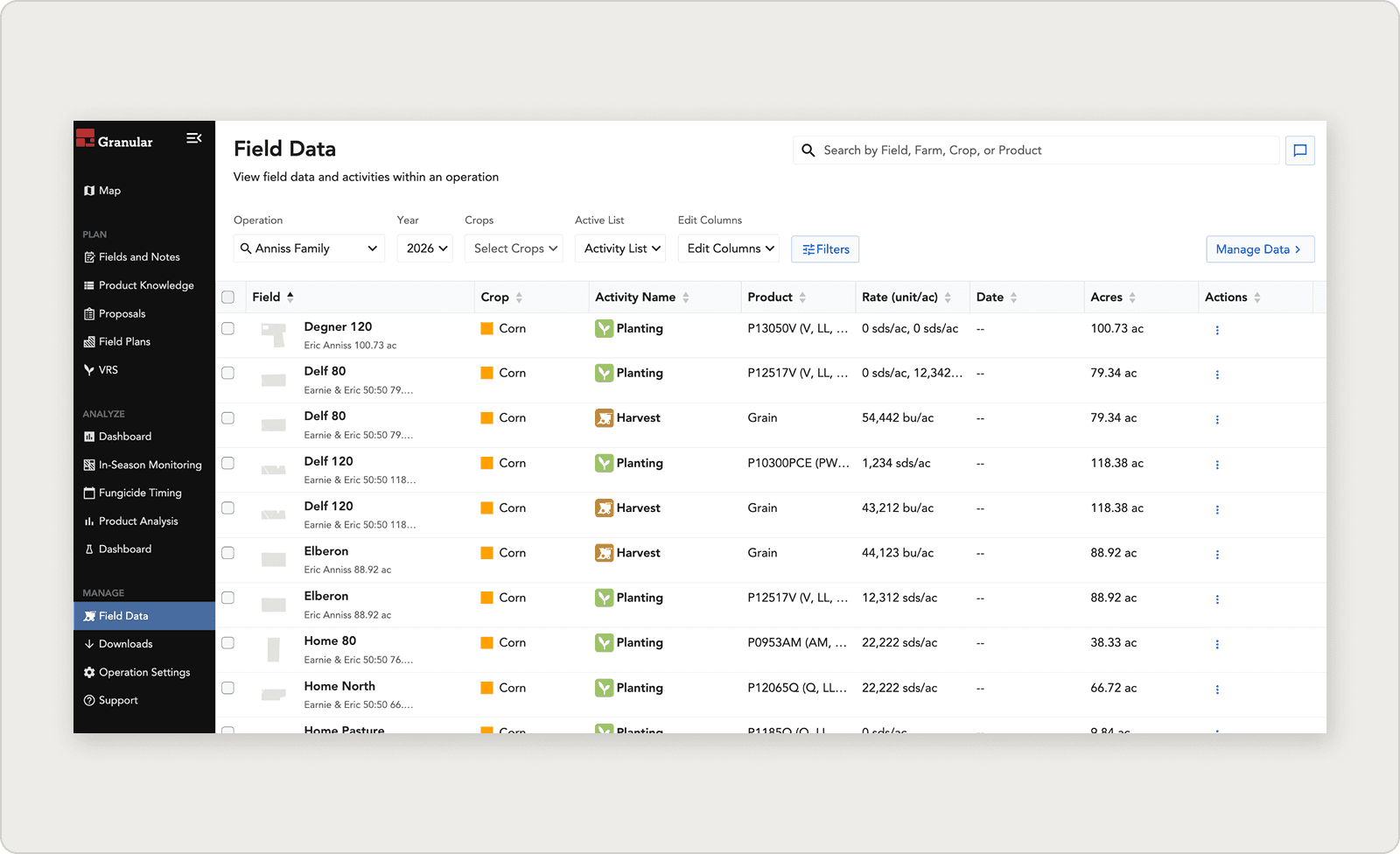
Pre-map navigation: a data table of operations and fields.
Reps had to scroll, sort, and cross-reference to find what they needed.
RESEARCH QUESTION
"How might we validate — or invalidate — the value of a map view for sales reps, before committing to the engineering effort to build one?"
THE CONCEPT
Designing to test, not to ship.
I designed a Figma prototype of a map-first navigation experience inside Granular Insights. The prototype wasn't the final design. It was meant to be interrogable: clear enough for reps to react to, flexible enough that any part could be cut.
The concept covered an operations and fields panel, satellite map with field boundaries, field cards on tap, and filters.
Research Setup
Working with our UX Researcher, we recruited six users: four sales reps (Tony, Megan, Kyle, Tanner) and two territory managers (Mitch, Matt). Five clear research objectives:
01
Understand why a map is valuable
What use cases does it actually serve in a rep's daily work?
02
Identify missing features
What would reps want that wasn't in the concept?
03
Test whether the flow matched rep mental models
Does navigation feel natural, or are reps fighting the structure?
04
Pinpoint the MVP elements
What's essential to ship vs. what can wait?
05
Assess usability to inform scope
Are there interaction issues that would block adoption?
THE PROTOTYPE
Using AI to test interaction
The concept started in Figma: but it quickly became clear that a static click-through wasn't going to cut it for research. The whole value proposition of the feature was feel: the snap of a field boundary appearing, the tap-to-reveal panel, the way filters collapsed and expanded the view. None of that is testable in a prototype where every interaction is a pre-scripted screen transition.
A map feature needs to be experienced as a map, not mimed as one.
BUILT WITH AI
I used AI to build a fully interactive coded prototype in a day.
Rather than asking engineering to build a throwaway prototype, or accepting the limitations of Figma, I used Lovable: an AI-powered app builder: to generate a working React prototype with a real Mapbox integration. I described the feature in plain language, iterated on the interactions through conversation, and had a testable build running the same day I started.
This wasn't about cutting corners on design craft: it was about matching the fidelity of the test to the fidelity of the question. The prototype let reps do the thing we needed to observe: actually navigate their territory on a map, tap into a field, filter by crop, and tell us whether it matched how they work.
Video of the interactive prototype built with ai, allowing users to pan and zoom on an actually mapbox map let user feel how the interactions would happen when fully developed.
What the interactive prototype unlocked
Reps could actually explore, not just observe
Instead of watching a researcher click through frames, reps drove the session themselves — panning to their actual territory, tapping the fields they'd stand in front of the next morning. That self-directed navigation surfaced behavior and preference that a guided walkthrough would have masked.
The v1 → v2 mental model finding only emerged because of real interactions
The insight that reps wanted a cross-operational view came directly from watching them try to use the operations-first prototype and hit a wall. In a static Figma prototype, they would have clicked "next" and moved on. In Lovable, they paused, expressed confusion, and told us exactly what was wrong.
TAKEAWAY oN AI tOOLS IN THE DESIGN PROCESS
AI didn't replace the design work. The thinking, the research strategy, the iteration from v1 to v2 was all still designer-led. What it replaced was the fidelity ceiling. AI let me match the prototype to the question, not the other way around.
FROM THE FIELD
Four findings
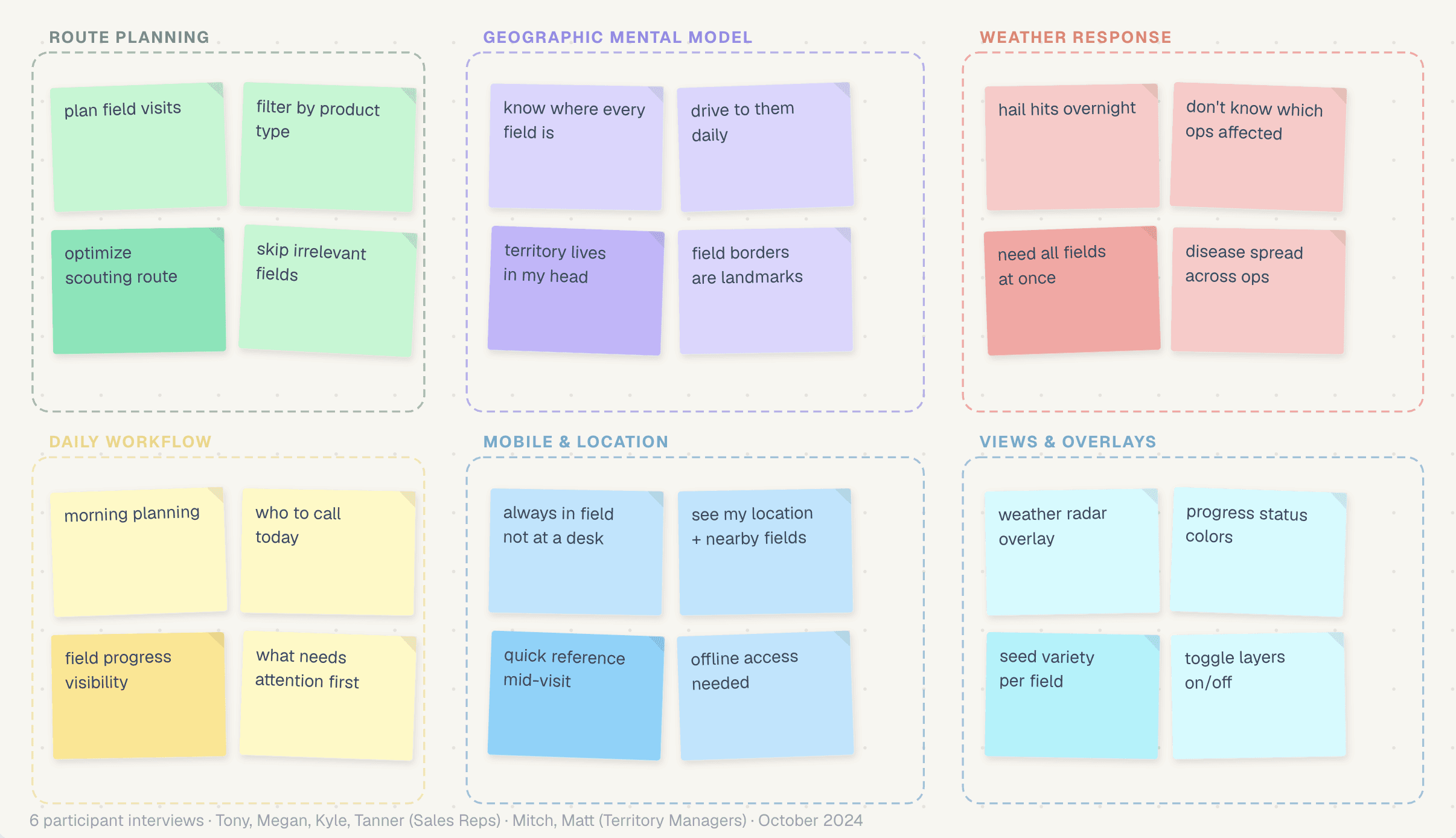
6 user interviews synthesized into 6 theme clusters · October 2024 · FigJam
Insights Shared
Insights were collected in Dovetail and shared throughout the team. The report clipped real parts of interviews with users to highlight the importance of their quotes.
01
Crop scouting is the use case the map unlocks
Crop scouting — driving out to check fields in person — is one of the reasons growers choose Pioneer seeds. Reps saw the map as the tool that would make scouting more efficient: filter by product, plan a route, scout the fields that matter, and skip the rest.
02
Low learning curve, high satisfaction
Reps rated the feature 8 out of 10 for usefulness in their day-to-day. Nobody needed onboarding to use it. From an adoption standpoint, that's the cheapest possible product.
03
Reps want to control what they see — map views matter as much as the map itself
Hail storms and disease outbreaks don't follow operation boundaries. A rep needs to see all their fields in an affected area at once, then act. The table view forced them to check operation by operation — the map collapses that into one screen.
04
This belongs on mobile
Reps are in the field. They need this on their phone, with their location, with nearby fields visible in real time. Web is the start — mobile is where the value compounds.
Finding 03 in depth: Letting Reps Customize their View
Reps weren't just asking for a map, they were asking for a map that could answer different questions on different days. The same territory looks completely different when you're planning a scouting route vs. responding to a hailstorm vs. reviewing what's been planted this season. A single static view can't serve all of those contexts. Reps needed to toggle layers.
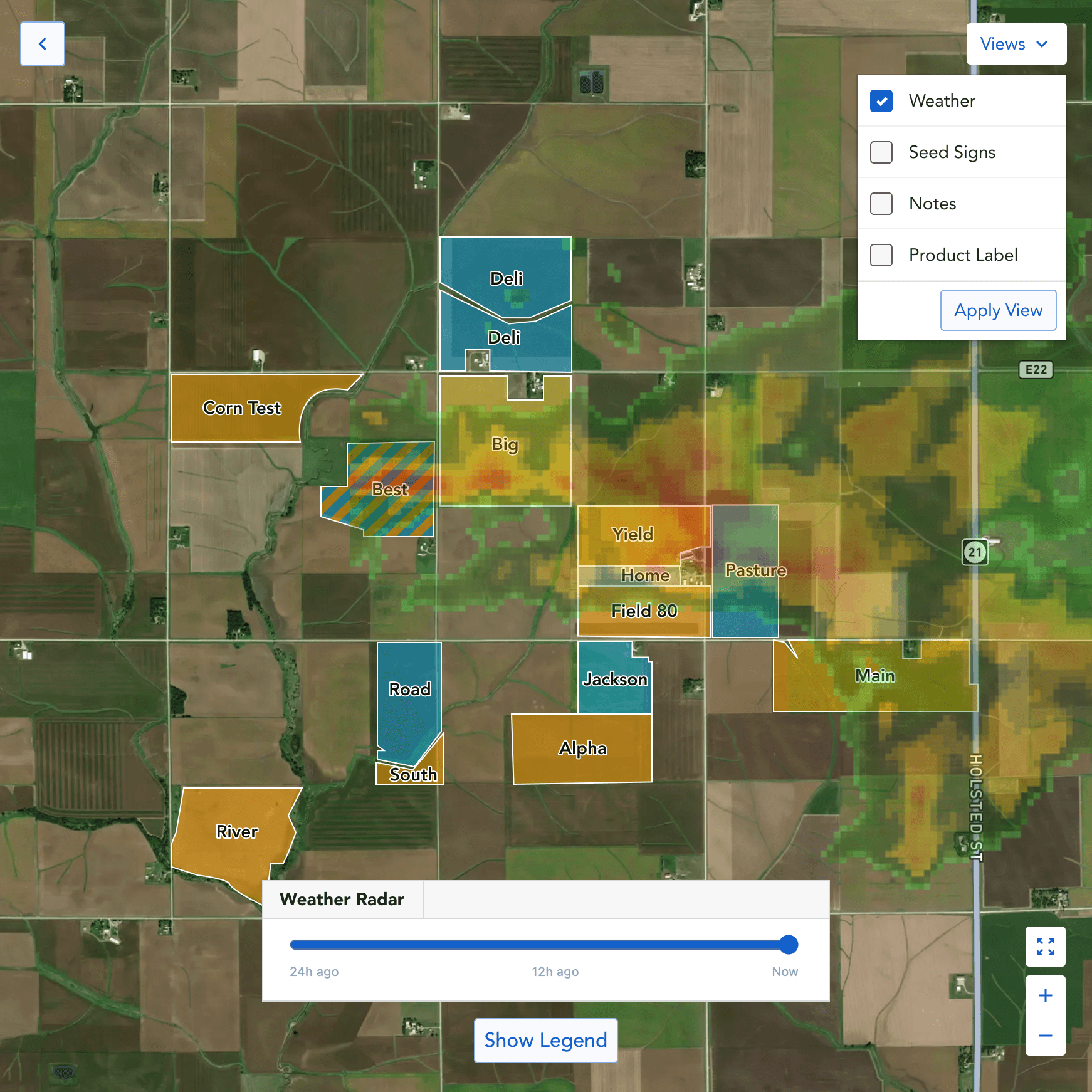
Weather Radar
Immediately see which fields sit inside a hail storm letting users know which fields were hit.
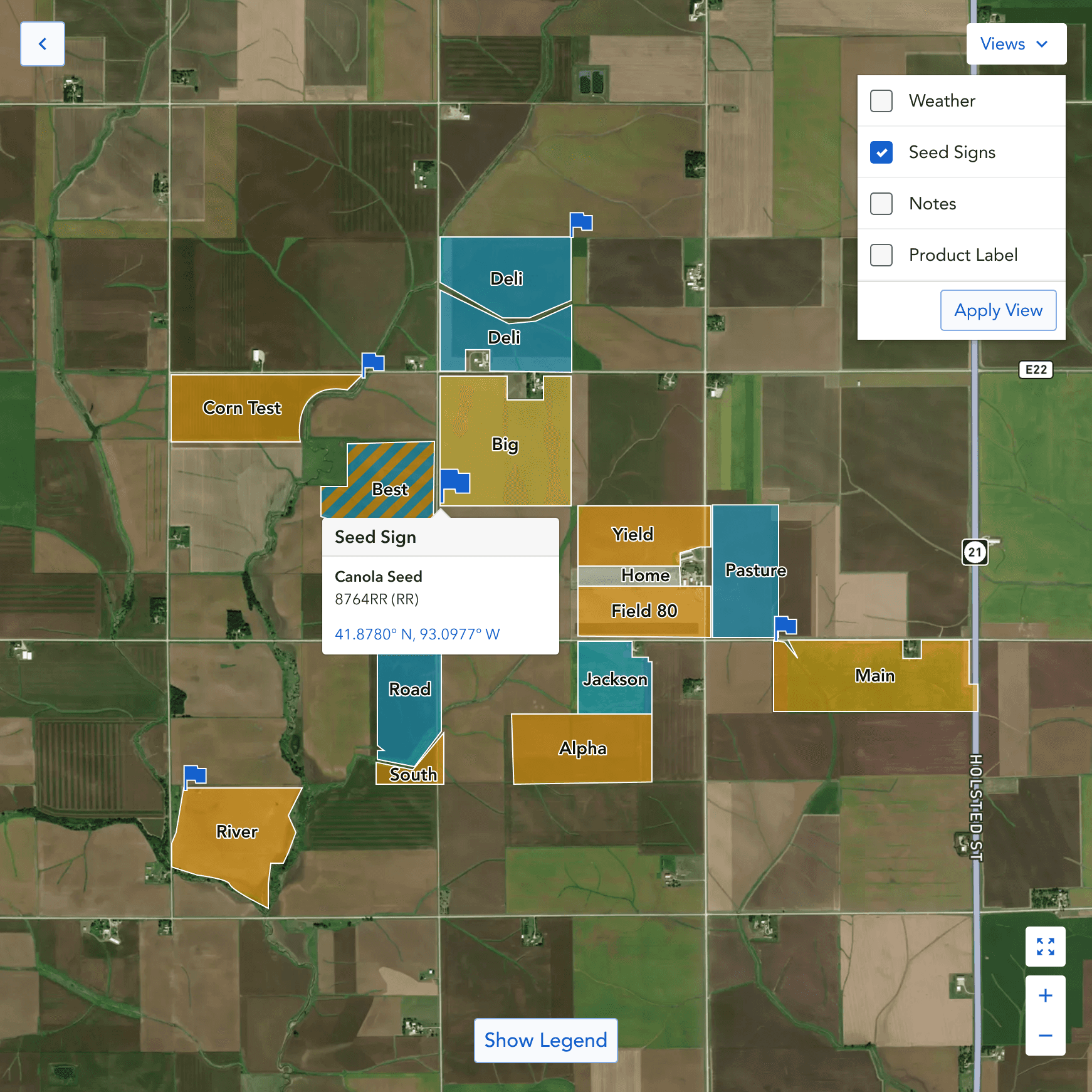
Seed Sign Placement
A big administrative pain was remembering where seed signs where placed.
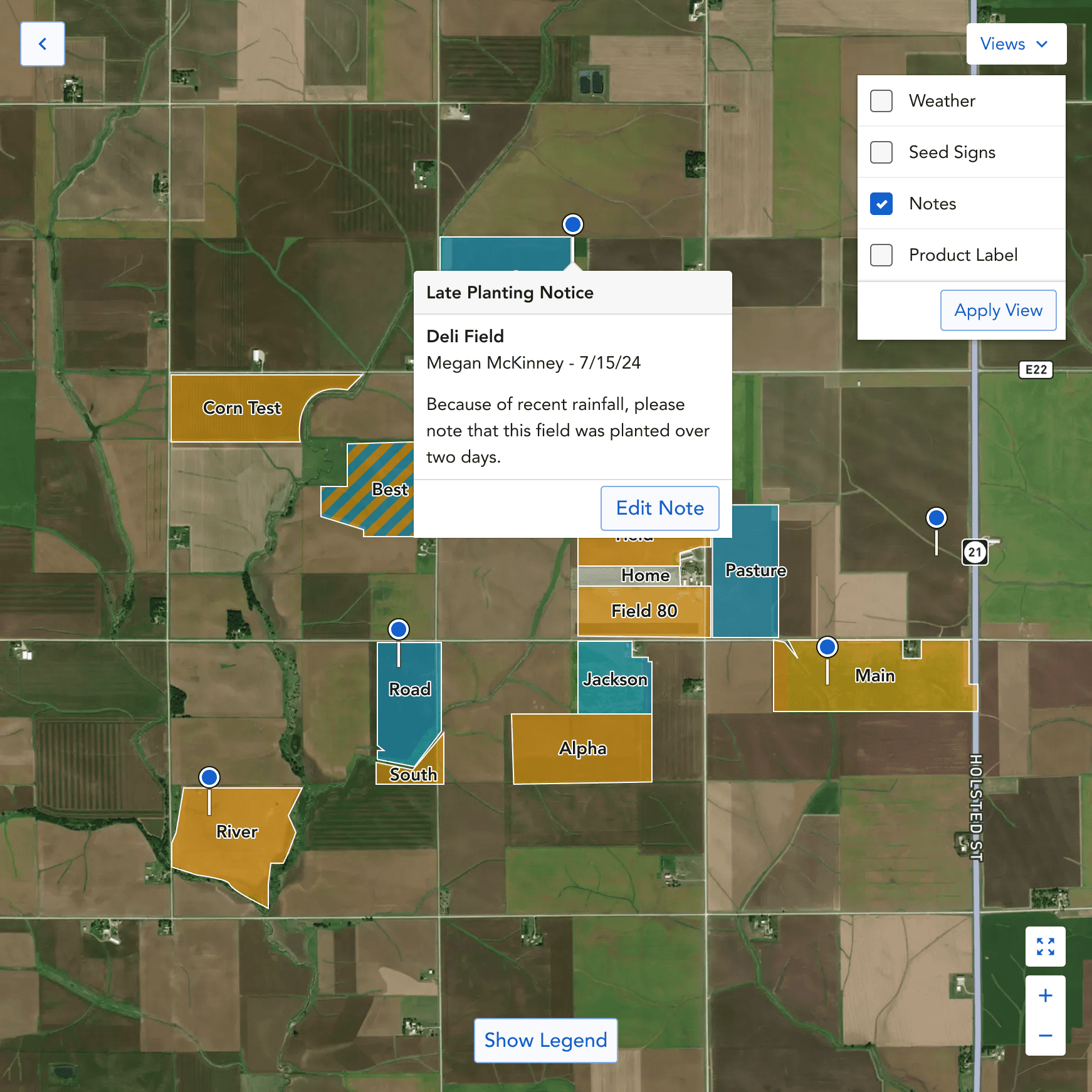
Notes
Notes add an easy way to remember information at a physical location.
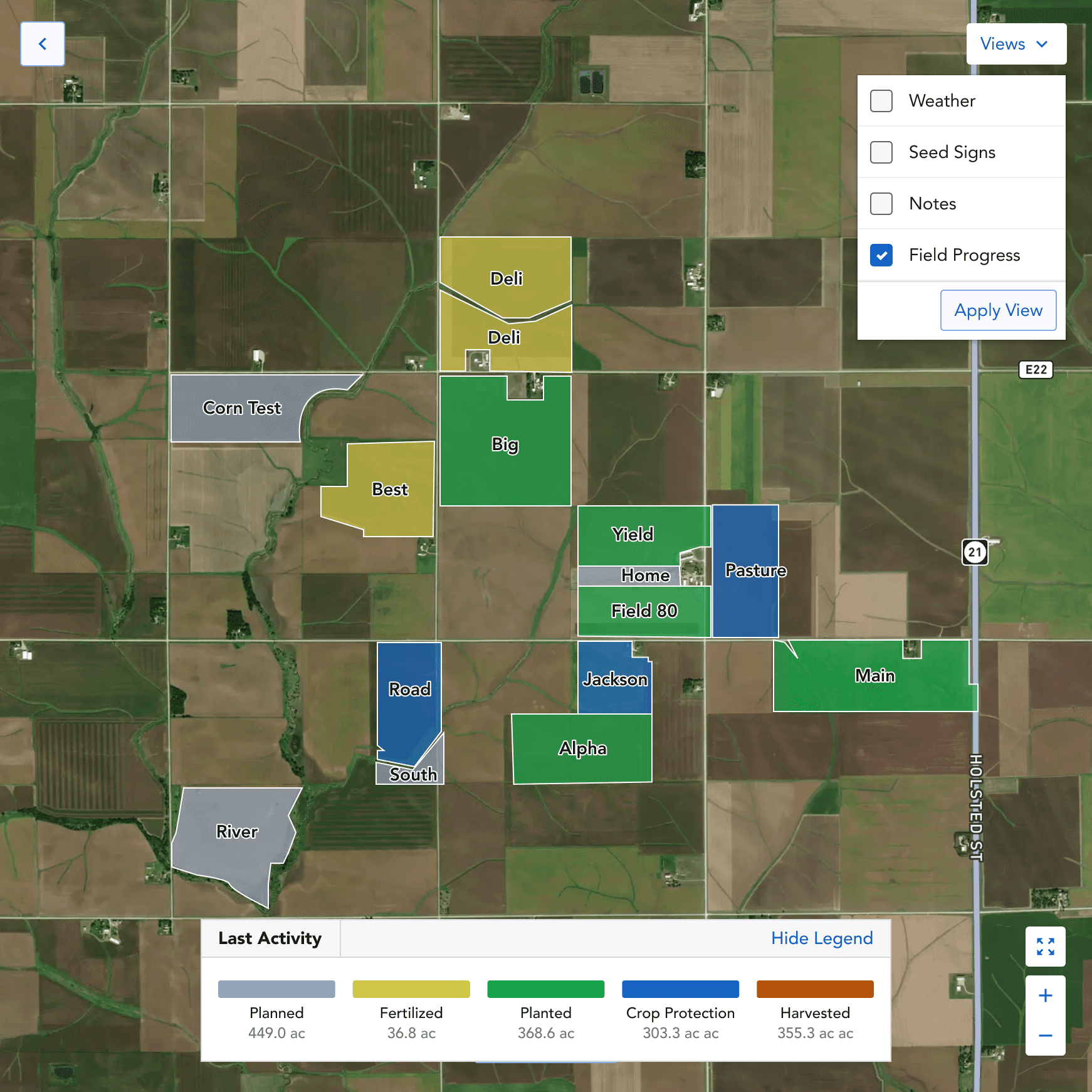
Seed Sign Placement
Color-code every field by last activity planned, planted, harvested, etc. to give reps a progress overview.
THE ITERATION
The mental model already is a map.
The first version of the prototype matched Granular's existing data structure. To see your fields, you first selected an operation from the left rail, and the map populated with that operation's fields. A natural translation of the data table into map form.
Research revealed the problem: reps don't think about their work that way.
Sales reps know where every grower's field is. They drive to them. They walk them. They have stood at the edge of Carl Farm's Field 24 and looked across to Golden Farms' East Field a quarter mile away. Their mental model of their territory is — and always has been — a map. The operations-first concept asked them to do an unnatural thing: pick an operation before seeing geography.
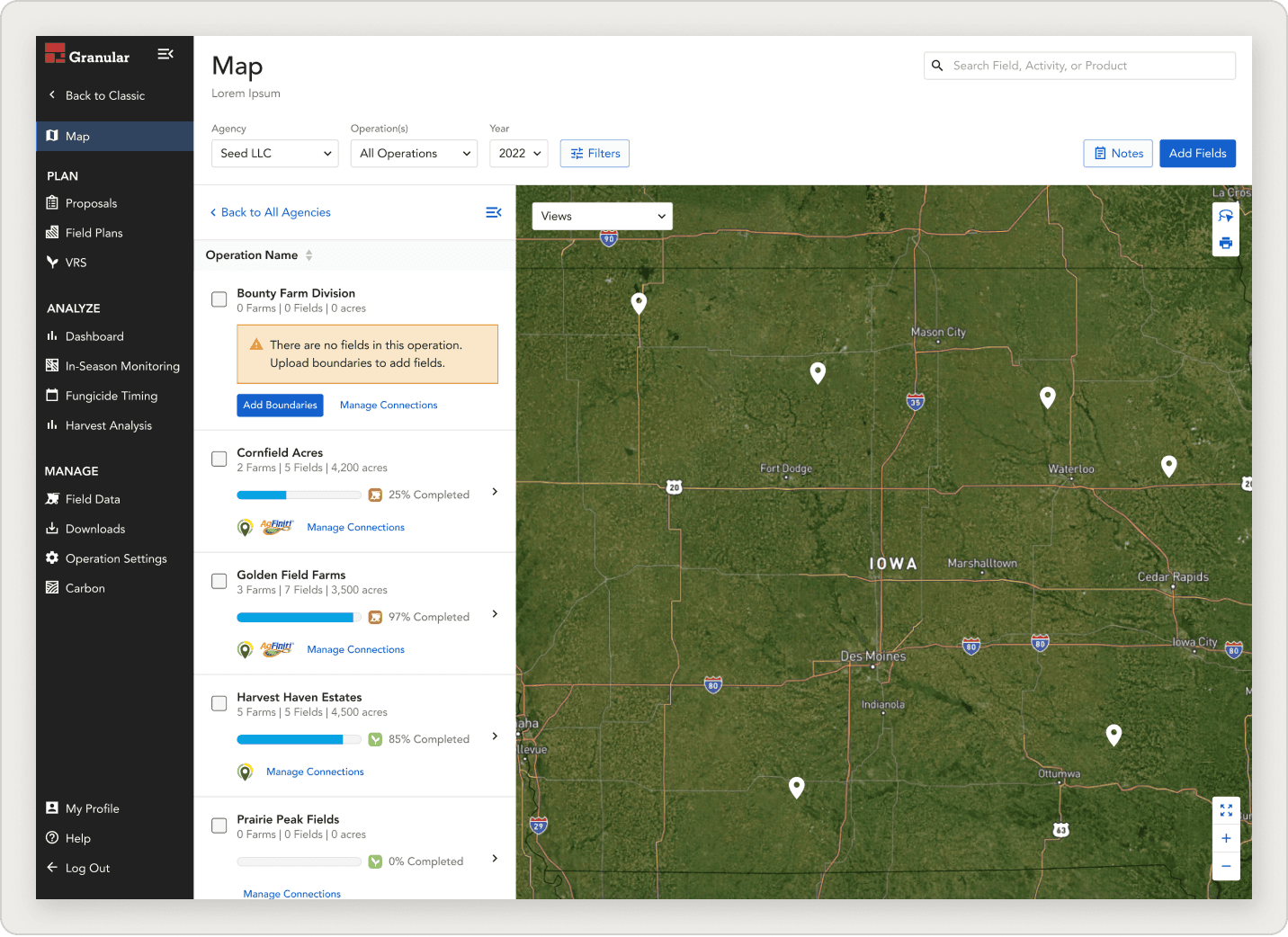
Concept v1 — Operations First
Pick an operation, then see fields.
Mapped directly to Granular's data model — but asked reps to choose a context before seeing geography. Created friction that didn't exist in real life.
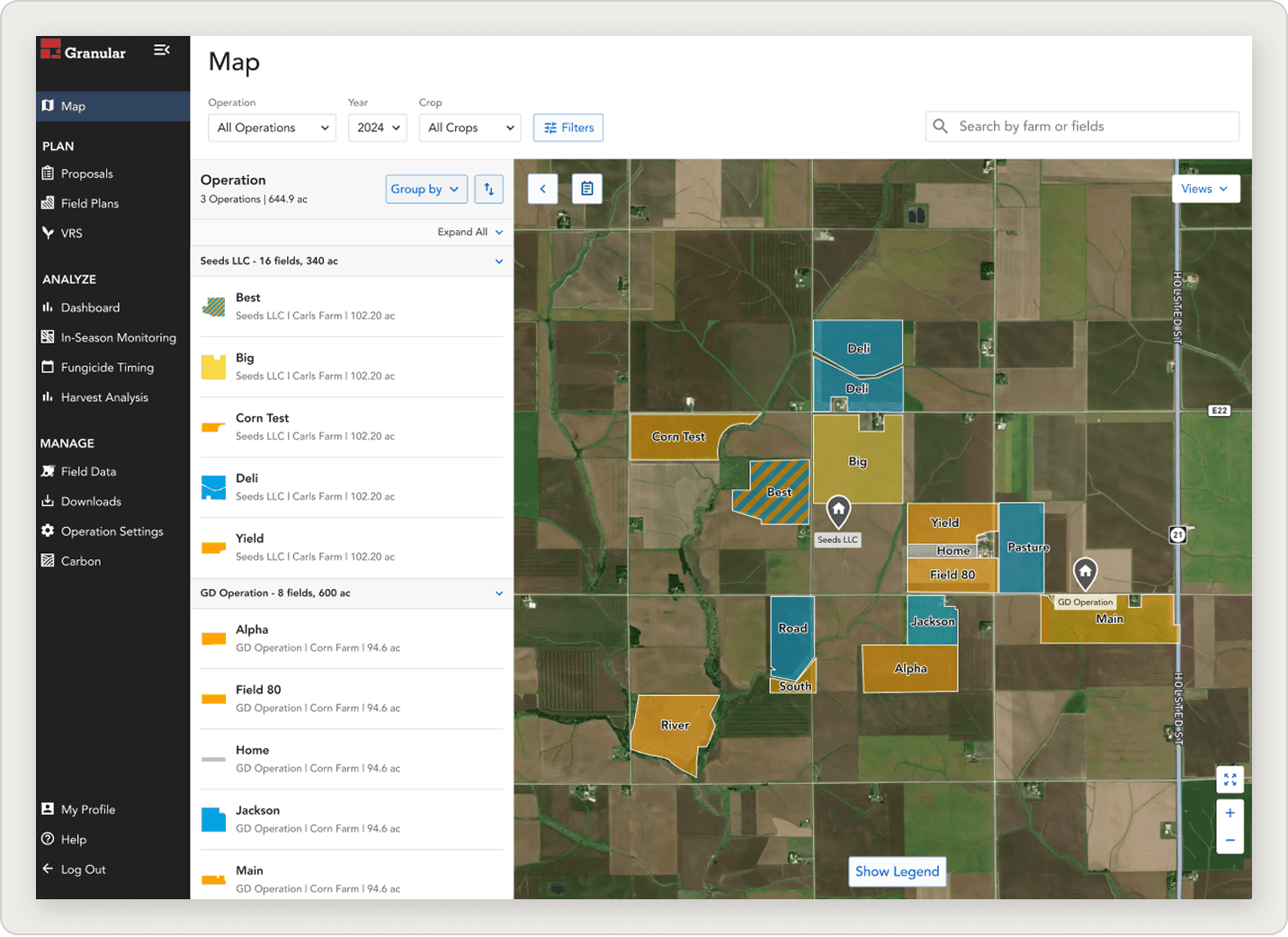
Concept v2 — Geography First ✦ Shipped
See your territory. Drill into fields.
All operations and fields visible at once. The operations panel becomes a filter, not a gatekeeper. Detail surfaces as the rep zooms — matching the way they actually think.
SECTION
Defining
scope.
With research in hand, the team made some key MVP decisions.
Build it as a dedicated section, not a homepage
Reps needed to find it easily, but a daily/sales dashboard was a better candidate for the app's landing experience.
Keep it view-only for field data
Reps preferred read-and-explore behavior. Adding analytics or edit actions could come later, based on usage data.
Show operations and fields in one cross-operational view
The finding from the mental-model research. The map is the surface. The operations list is a filter, not a gatekeeper.
Mobile is needed
Mobile location-aware behavior was the strongest forward-looking opportunity
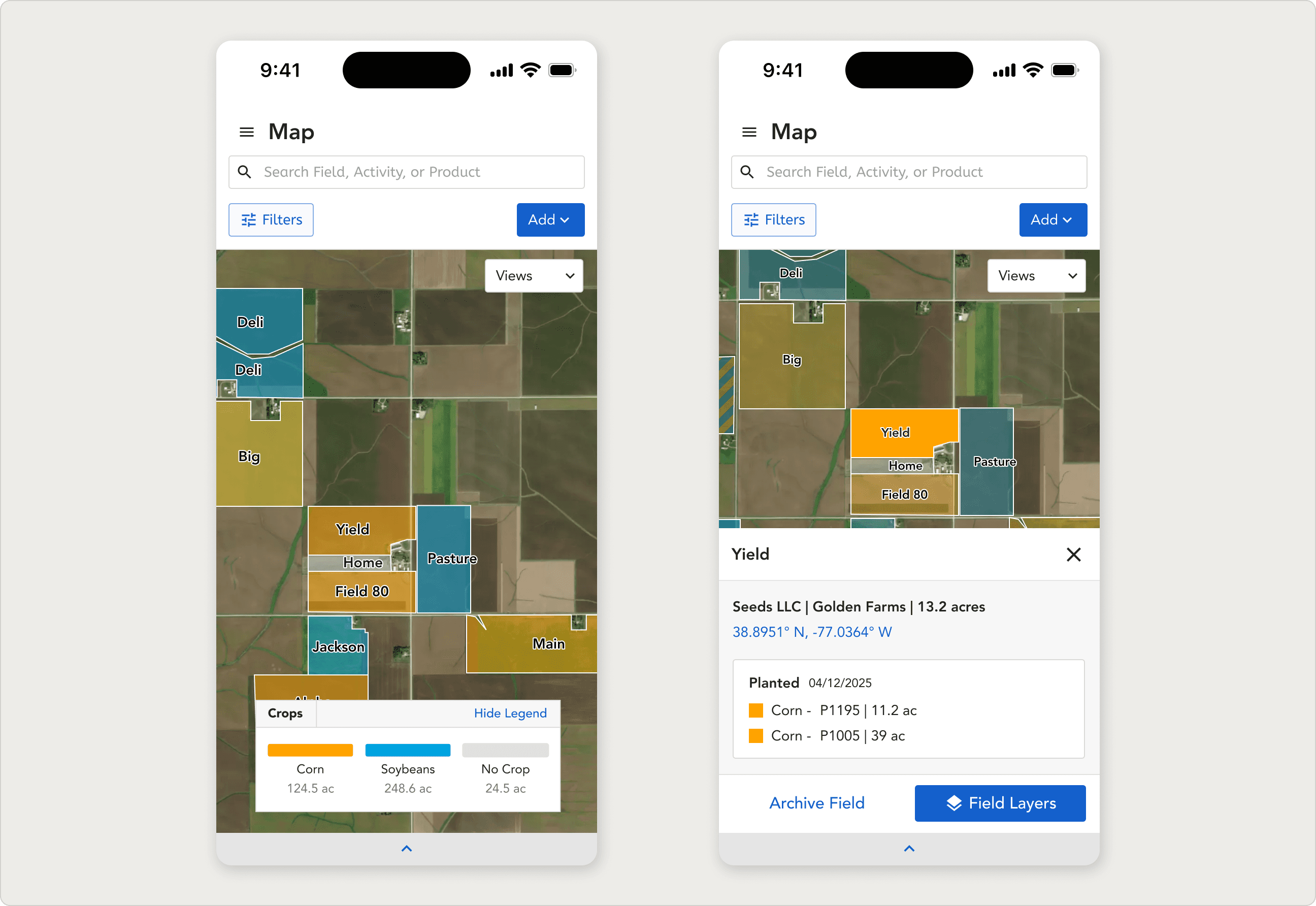
Mobile concept: the same map, with location awareness. The strongest forward-looking opportunity from research.
KEY INSIGHT
The map was a quick win that resolved an internal debate. Territory managers said it directly: a tool reps had been asking for, finally delivered, would help convert skeptics to Granular.
REFLECTION
What I learned.
01
Concepts can settle debates that opinions can't.
Designing for ABA without ABA experience could have been a credibility problem. It wasn't, because we built a shared glossary early and kept it living. Treating "shared language" as a deliverable saved hours of meeting confusion and produced better terminology in the UI.
02
Designing for sales reps means designing for people you can't watch work.
These reps are in trucks, in cornfields, in growers' kitchens. Their work doesn't happen at a screen, so observation-style research is harder. The map only resonated because we got crop scouting, seed sign placement, and weather response into the conversation early — and let reps tell us how a screen could fit into their actual day.
03
The product has to match the mental model, not the data model.
The biggest design moment on this project was the cross-operational pivot. Granular's data is organized by operation — so the original concept was too. But sales reps don't think in operations. They think in geography. A map only feels like a map when it shows you everything at once, the way the territory actually looks from the driver's seat. When the data structure and the user's mental model disagree, design to the mental model.